Product led growth SaaS playbook for 2026

In 2026, PLG isn’t a strategy—you either design for self-serve revenue or you bleed pipeline to faster onboarding, clearer pricing, and tighter activation loops. You can ship features all quarter and still stall if users don’t reach the one moment where value becomes obvious.
This matters now because buyers expect to evaluate software inside the product, not on a call. At the same time, more of your “demand” shows up as anonymous traffic, which makes it hard to know what’s working—or which accounts to prioritize—unless you use tools like Radar to identify and qualify your own visitors and connect that intent to activation and sales follow-up.
You’ll get a practical playbook: what to do in the next 30 days, how to build a funnel that converts, choose the right monetization model, measure PLG honestly, and add sales without breaking self-serve.
The fastest path to PLG: your next 30 days
What if you had 30 days to prove your SaaS can grow through the product, not more campaigns? You move fastest by choosing one activation milestone, measuring every step to it, and shipping weekly changes that make more users reach that moment. Tools like Radar can help agencies identify and qualify their own traffic so you know which companies are even worth optimizing for, but the core PLG work still happens inside your activation funnel.
Your goal isn’t “more sign-ups.” Your goal is “more users hitting the first value moment,” because that’s what creates retention, referrals, and paid upgrades later. When you focus on one milestone, you stop debating opinions and start learning from user behavior.
Pick one user job and one activation milestone to optimize
Pick a single user job your product must solve on day one. A “job” is the outcome the user hired your product for, like “review support tickets faster,” “ship a report to a client,” or “sync leads into my CRM.” When you pick one job, you can design onboarding and product defaults around it instead of trying to please every persona at once.
Define activation as the first proof the job is working. For example: “connected a data source and saw the first dashboard,” “invited one teammate and assigned a task,” or “published the first live page.” Keep it binary and behavioral, so you can improve it; if you need inspiration, the quickest way to avoid avoidable chaos is to scan launch mistakes to avoid and convert the common failure modes into checklist items for your first-week experience.
Instrument the funnel so you can see where users drop
Instrument the path from sign-up to activation with events you trust. Track each meaningful step (not every click): sign-up completed, workspace created, integration connected, first object created, first collaboration action, and activation achieved. Tools like Amplitude, Mixpanel, PostHog, or Heap work well here, and a simple event naming convention prevents “data archaeology” later.
Add context so you can segment and act. Capture plan type, acquisition channel, company size, role, and whether the user is new to the category, then compare conversion to activation across cohorts. If you’re an agency or serving agencies, Radar is useful here because it turns anonymous site traffic into actionable company insights, which helps you prioritize the segments that are already showing intent.
Ship three low-risk wins before you touch pricing or major UX
Ship weekly improvements that shorten time-to-value before you redesign anything. You’ll learn faster with small changes tied directly to your activation milestone than with broad “onboarding refresh” projects that take a quarter.
Remove one hard blocker: pre-fill empty states with sample data, add OAuth for the top integration, or eliminate an unnecessary verification step.
Add one guided path: a checklist that adapts to what the user already did, or a single “recommended setup” flow that ends at activation.
Fix one confusing moment: rewrite one key screen, rename one feature to match the user job, or add one inline explanation where users hesitate.
Resist pricing changes until activation is stable. If users aren’t reaching first value, pricing tests mostly measure confusion, not willingness to pay, and you’ll optimize the wrong thing.
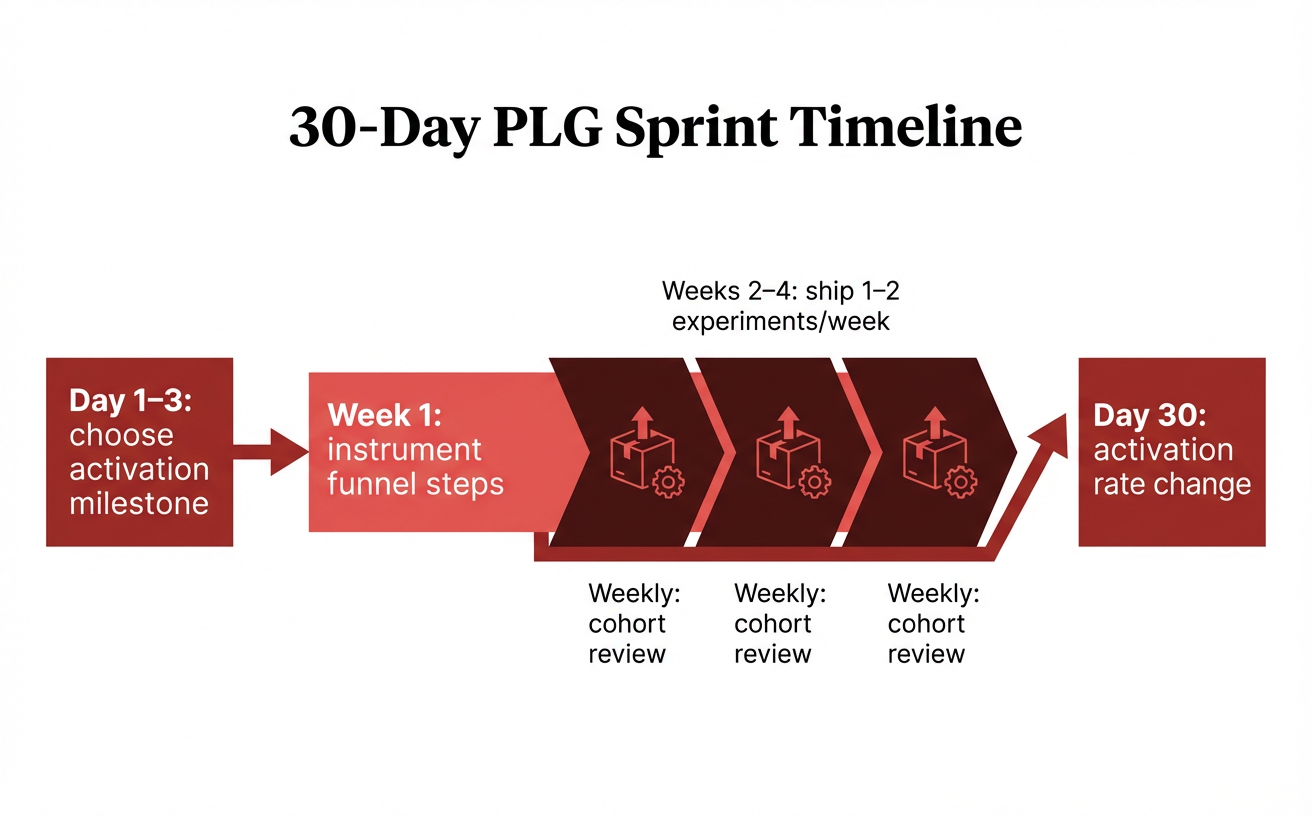
A simple 30-day sprint plan to prove PLG via one activation milestone.
Build a self-serve funnel that actually converts
Your PLG funnel only “works” when a user can discover value, reach value, and pay for value without waiting on a human. If any step depends on a reply from support or sales, you’ve built a demo funnel with a nicer landing page. The goal now is to make the self-serve path the default path, then use humans only to accelerate accounts that are already succeeding.
Start by treating acquisition, onboarding, and pricing as one continuous experience. When those three parts line up, you’ll see fewer stalled signups and more upgrades that feel inevitable. Tools like Radar help here because you can spot which companies are showing intent before they ever fill out a form, then tighten the pages and flows those accounts actually touch.
Design acquisition loops that fit your product’s natural sharing
Acquisition loops convert when sharing is a byproduct of getting work done. You don’t need “viral” features; you need moments where a user must involve someone else to finish the job. Build loops around what your product already outputs—reports, approvals, artifacts, embeds, or invites—so the next user arrives pre-sold on the value.
Make the loop measurable at the source, not just at signup. If you can’t tell whether “shared dashboard” beats “CSV export” as an acquisition driver, you’ll keep guessing. With Radar, you can connect anonymous site activity to real organizations so you can see which channels and pages bring in the right accounts, not just the most traffic.
Make onboarding deliver value in minutes, not sessions
Onboarding converts when the user hits first value fast, even with partial setup. Replace “complete your profile” with an action that produces an outcome, like creating the first project, running the first scan, or generating the first report. If setup is unavoidable, use defaults, templates, and sample data so the product demonstrates value before the user earns it.
Keep early steps lightweight and postpone anything that feels like paperwork. Progressive profiling works because you only ask for information when it unlocks the next benefit, like adding teammates or connecting a data source. If your product needs collaboration to shine, lead with inviting one teammate and show immediate shared context, not empty workspaces.
Use pricing and packaging to push users toward the right plan
Pricing converts when the upgrade is triggered by progress, not pressure. Users should bump into limits after they’ve succeeded, so the paywall feels like a logical next step. Make packaging communicate who each plan is for and which outcome it unlocks.
Choose one primary value metric (seats, usage, features, or outcomes) that matches how customers experience growth.
Place paywalls on “expansion moments” like adding collaborators, increasing volume, or unlocking advanced controls.
Make the upgrade path obvious in-product with a clear “what changes if I pay” comparison at the exact moment of need.
Expect edge cases like procurement-heavy buyers who can’t self-checkout, and handle them without breaking self-serve. Offer an invoice flow or assisted checkout while keeping the product usable and measurable. Radar can help your team spot those high-intent accounts early so you can provide help without turning every signup into a sales conversation.
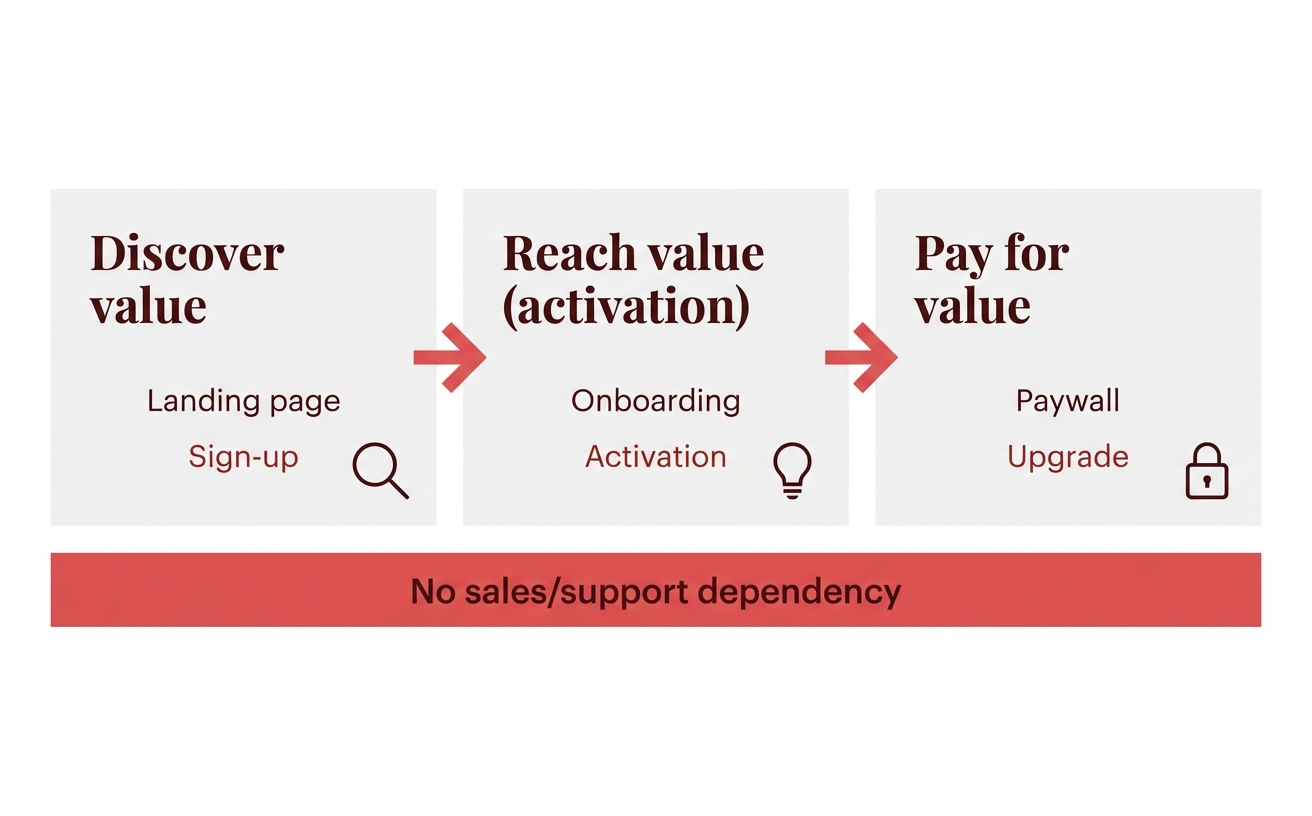
A self-serve funnel that delivers value and converts without human gates.
Nail activation: the one moment users must reach
A calendar SaaS I worked with thought “activation” meant finishing onboarding, until they noticed most “activated” users never created a real event. Activation jumped when they redefined the moment as “scheduled one meeting and invited one attendee”, then treated that moment like a product feature with an owner, a backlog, and weekly iteration. If you want PLG to compound, you make activation a thing you ship—not a number you report.
Define activation in product terms, not vanity terms
Activation works when it describes a user completing the job your product is hired for, not a generic milestone like “signed up” or “visited 3 pages.” A good activation definition is specific enough that a PM can improve it and an engineer can instrument it, and it should correlate with retention within a week or two. If you need inspiration, borrow the structure from MVP examples in software and write your activation as the smallest “first value” slice of your core workflow.
Use a simple test: if a user hits your activation event, could they credibly say “I got value” without you explaining the product? If the answer is no, you’re measuring movement, not value. Radar can help here by showing you which companies are repeatedly returning to your product after hitting activation, so you can validate that your definition maps to real intent, not curiosity clicks.
Remove friction between sign-up and first value
The fastest activation wins usually come from deleting steps, not adding education. Every required field, confirmation email, and workspace setup screen is a tax you’re charging before you’ve delivered anything. Your goal is to get users to “first output” (a report, a task, an integration, a shared link) in minutes.
Delay commitment: ask for a password, company size, or billing details only when it unlocks a feature the user already wants.
Default to templates: pre-load an example project/report so the empty-state doesn’t feel like homework.
Make the first win one screen away: after sign-up, land users directly in the workflow that produces value.
Use in-app guidance that adapts to what the user does
Static product tours underperform because they assume every user has the same intent. Instead, trigger guidance based on behavior: if someone imports data, guide them to their first dashboard; if they invite a teammate, guide them to permissions and collaboration. You’ll ship fewer tooltips and get more completed workflows because your guidance is reacting to the user, not lecturing them.
Start by mapping 2–3 activation paths for your main personas, then instrument the “stuck points” on each path (rage clicks, repeated back-and-forth, timeouts). With Radar, agencies can also identify which visiting accounts are looping on those stuck points, so your team can prioritize fixes that unlock activation for the traffic you already have.
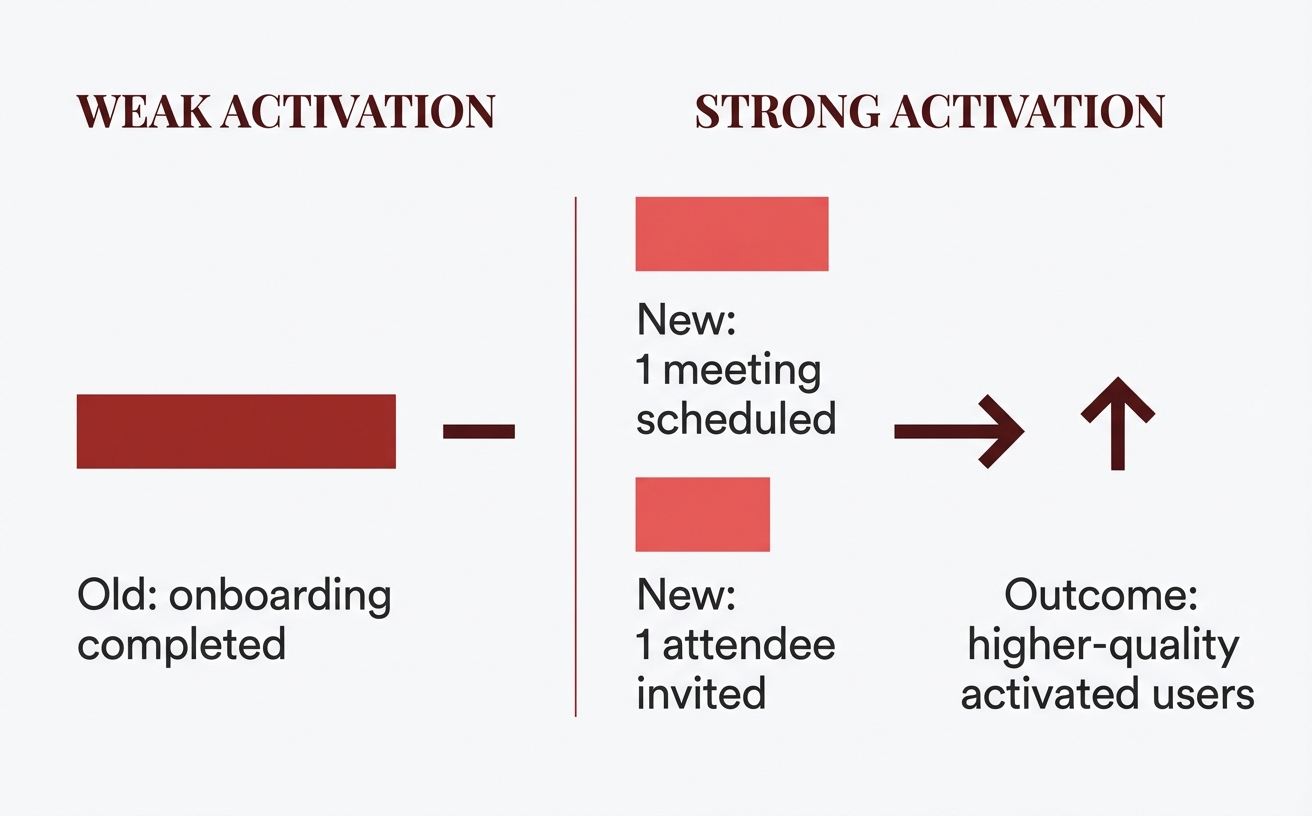
Define activation as the first real value event—not a checklist completion.
Monetize with freemium, free trials, or hybrid—without guessing
Pick your monetization model by mapping it to how fast users hit first value and how naturally value spreads across a team. If you try to “A/B test your way” into pricing without that map, you’ll mostly learn which discount is louder, not which model fits your product. Use the activation insights you just uncovered to choose a model that makes the next step obvious instead of forcing it.
Start by tagging the moments that signal willingness to pay (saved work, shared work, automated work, integrated work), then watch where users repeatedly bump into limits. Tools like Radar help agencies identify which companies are consuming value but staying anonymous, so you can validate whether your paywall is creating healthy upgrades or just silent churn.
Choose the model based on time-to-value and collaboration needs
Use freemium when your time-to-value is minutes and users can keep getting meaningful value solo. Freemium works best when ongoing usage creates data, history, or content that users feel invested in, because that makes upgrades feel like protection of something they already own. You’ll still need a clear “why pay” moment, or you’ll just grow support tickets instead of revenue.
Use a free trial when value requires setup time, integrations, or importing data before the product really clicks. Trials give you permission to show the whole product, then convert when the user sees the end-state, not the empty-state. Hybrid (freemium + trial of premium) fits products where basic value is instant, but advanced value needs a short guided sprint to fully appreciate.
Design paywalls that feel like a natural next step
Make your paywall show up at the moment the user is already asking for “more,” not when they’re still proving the product works. A good paywall interrupts progress with a choice that preserves momentum: upgrade, invite teammates on a paid plan, or start a premium trial without losing work. If you want a tighter connection between product decisions and cash, bake these moments into your broader revenue approach and cross-check them against SaaS revenue best practices so your paywall logic matches your billing and retention strategy.
Instrument paywall hits as a funnel, not an event. With Radar, you can spot specific accounts repeatedly reaching a limit (like exports or integration caps), which tells you whether you need a clearer upgrade path, a different limit, or a packaging tweak.
Decide what’s metered: seats, usage, features, or outcomes
Meter what scales with customer value and cost, then keep the unit easy to predict. If users can’t estimate next month’s bill from today’s behavior, they’ll self-throttle and adoption will stall.
Seats: clean for collaboration products; pair with role-based permissions so “viewer” seats don’t feel punitive.
Usage: great when value grows with volume (events, credits, minutes); show real-time usage dashboards to reduce anxiety.
Features: simplest to message; reserve for clearly premium capabilities (admin controls, compliance, advanced automation).
Outcomes: powerful when you can measure results (qualified leads, resolved tickets); define the outcome precisely to avoid billing disputes.
When you’re unsure, default to one primary meter and one safety valve (like overage caps or alerts). That combination protects trust while still letting customers scale inside the product instead of renegotiating every time they grow.
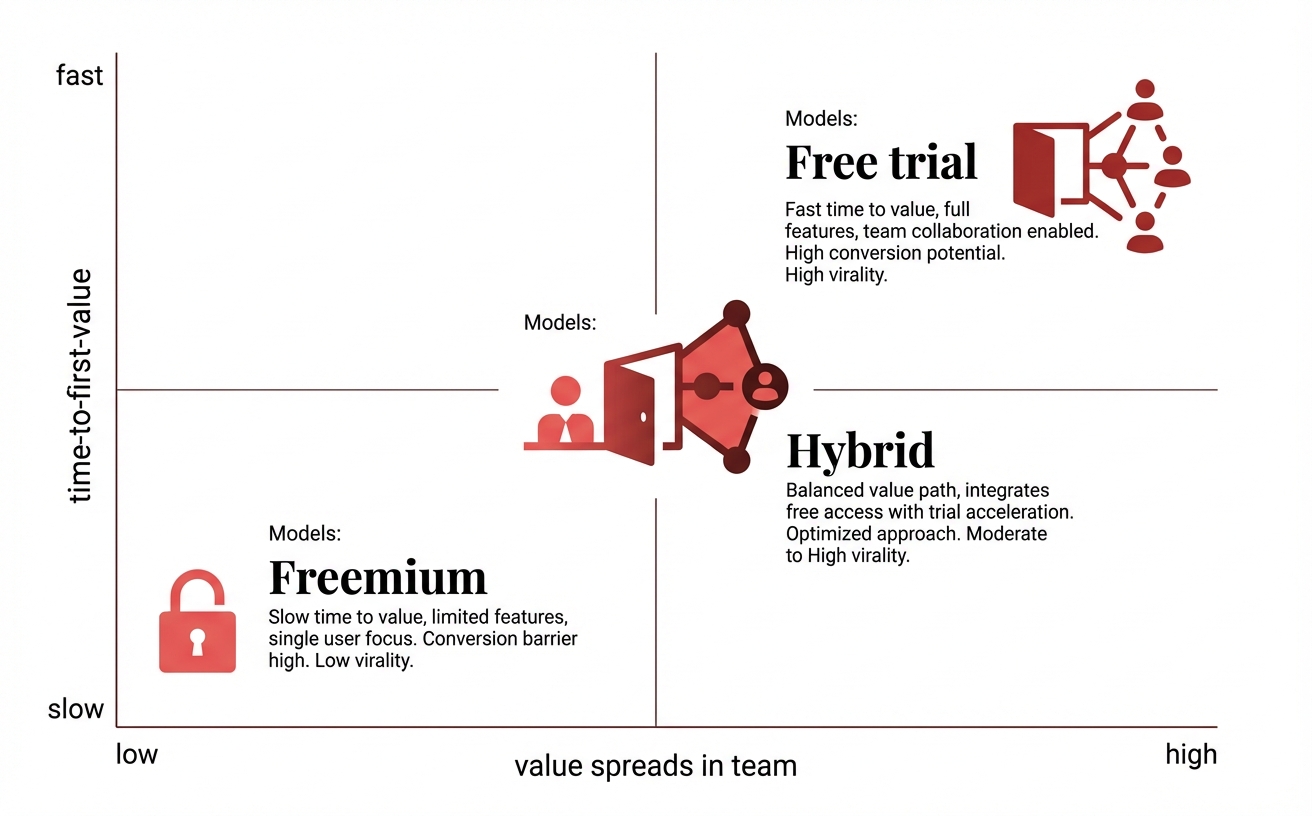
Choose a monetization model by matching it to product value timing and spread.
Retention and expansion: turn daily use into compounding growth
Are your users coming back because your product is part of their workflow—or because you keep reminding them it exists?
PLG gets durable when retention and expansion happen as a side effect of doing real work, not as a reaction to pushy prompts. You already designed meters and guardrails so customers can scale without renegotiating; now you need the product to naturally create the next “why” to return and the next “who” to invite.
Build product habits with milestones, not naggy notifications
Habit formation comes from progress users can feel, so make the next meaningful milestone obvious the moment they complete the last one. If your product helps teams ship tasks, a milestone might be “first project completed,” then “first recurring workflow,” then “first handoff to another teammate.” Each milestone should reduce future effort, so users learn, “If I do this once, life gets easier next time.”
Trigger habit loops with in-context cues that appear at the moment of intent, not at 9 a.m. because your scheduler says so. A subtle checklist that updates as users work usually beats a drip campaign that guesses what they care about. If you run an agency, tools like Radar can help you spot which accounts keep returning from the same company, so you can validate that your “milestone path” is actually sticking for real teams, not just single-user trials.
Create expansion triggers inside the product experience
Expansion should feel like removing a bottleneck, not buying “more software.” The cleanest triggers show up when a user hits the edge of solo success and needs collaboration, governance, or scale. Design those moments so the upgrade is a natural continuation of the task they’re already doing.
Collaboration triggers: sharing, comments, approvals, or handoffs that require inviting teammates or adding seats.
Governance triggers: roles, permissions, audit logs, or workspace controls that appear once multiple people touch the same assets.
Scale triggers: higher usage limits, automation runs, API access, or advanced integrations that unlock faster throughput.
Make the trigger educational by showing the consequence: “Add a reviewer to unblock publishing,” not “Upgrade to Pro.” When you do this well, expansion becomes part of the user’s definition of success.
Use lifecycle messaging to support, not spam
Lifecycle messaging works when it answers the user’s next question: “What should I do now?” or “Why did this break?” Keep it tied to observed behavior—like stalled onboarding, a failed integration, or a team that’s active but missing a key setup step.
Use fewer messages with sharper intent, and prefer channels users can act on immediately (in-app, product inbox) over broadcast email blasts. If you’re an agency monitoring your own pipeline, Radar can also help you identify high-intent account activity so your outreach lines up with the customer’s moment of need, not your campaign calendar.
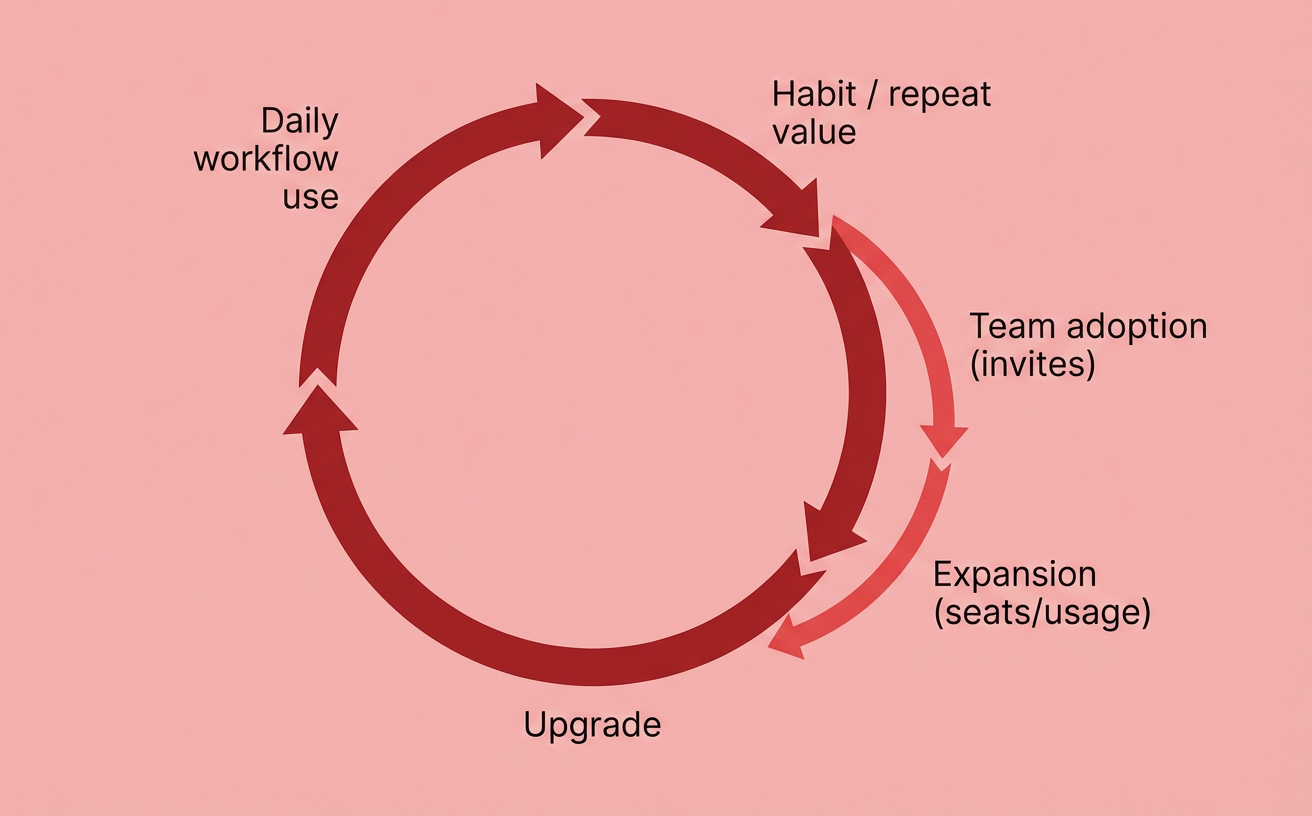
Retention compounds when the product becomes part of real work.
PLG metrics that prevent you from fooling yourself
If your PLG dashboard makes you feel good but doesn’t change what you build next, it’s lying to you. You know PLG is working when activation, retention, and expansion improve inside cohorts, not when sign-ups spike from a one-off campaign. You also avoid whiplash decisions because you can separate “we acquired more people” from “the product got better at creating repeat value.”
That matters right after you start aligning outreach to real intent, because the next step is proving whether those high-intent accounts actually become successful users. Tools like Radar help agencies connect account-level interest to what happens next in-product, so you don’t confuse “visited pricing” with “reached first value.”
Pick one north star metric and three input metrics
Your north star metric should describe the value users repeatedly get, not the work they do to use your app. For a collaboration tool, that might be “weekly active workspaces with 3+ contributors,” because it bakes in teamwork and recurrence. For a data product, it could be “successful automated runs per week,” because it captures outcomes, not clicks.
Then choose three input metrics you can actually influence with product work in a sprint. Keep them tightly coupled to the north star, and keep them stable long enough to learn.
Activation rate: % of new sign-ups who reach your activation milestone (for example, “invited a teammate and completed first shared task”).
Time-to-value: median minutes/hours from sign-up to first value (shorter usually beats “more steps” for self-serve).
Week 4 retention: % of activated users who still do the core action in week 4 (a simple check against “flash-in-the-pan” usage).
Measure activation and retention with cohort analysis
Cohorts turn opinions into curves. Start with weekly sign-up cohorts and track: (1) what % activates, and (2) what % returns to the core action each week after activation. If activation improves but the retention curve stays flat, your onboarding got smoother but the product’s ongoing value didn’t.
Segment cohorts by meaningful differences: acquisition channel, persona, use case, or “solo vs team” behavior. If you’re doing any forecasting, borrow the discipline from predictive analytics insights and validate predictions against cohort reality, so “expected retention” doesn’t become a story you tell yourself.
Add monetization metrics that connect product usage to revenue
Revenue metrics should explain why people pay, not just whether they pay. Track free-to-paid conversion by activation cohort, then add one usage-to-revenue bridge metric—something like “% of accounts hitting the usage limit,” “teams with 5+ members,” or “workflows automated per week.” Those bridges tell you which product moments create willingness to upgrade.
For expansion, follow net revenue retention and expansion MRR by cohort, but always pair it with a product signal (seats added after inviting, projects created after templates, or integrations connected after hitting scale). If Radar shows a specific agency account repeatedly returning from the same company domain and you see their in-product usage crossing your expansion trigger, you’ve got a clean reason to prioritize success motions without disrupting self-serve.
Explore Radar to Qualify Your Traffic If you’re building a product-led growth SaaS motion at an agency, Radar helps you identify anonymous visitors and turn them into actionable insights that boost your pipeline. |
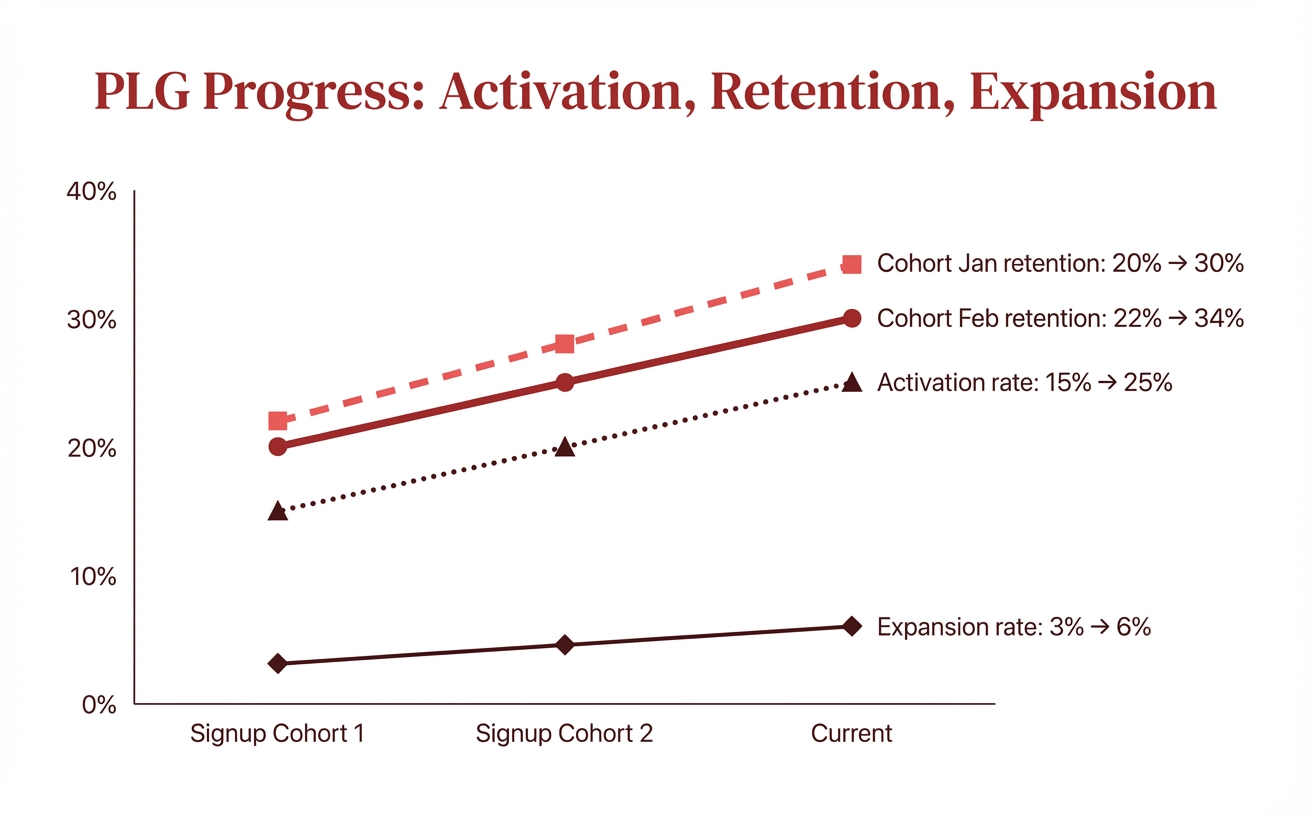
PLG is real when cohorts improve—sign-ups alone can mislead.
When PLG needs sales: product-led sales without killing self-serve
A founder I worked with watched a “self-serve” signup turn into a 60-day limbo because the buyer needed SSO, a security review, and an invoice. The product did its job—users activated and invited teammates—but nobody helped the account buy once complexity showed up. Product-led sales works when sales accelerates high-intent accounts while everyone else stays on the fast, no-friction self-serve path.
If you’re already seeing repeat visitors from the same domain and in-product usage crossing your expansion triggers, sales becomes a timing tool, not a takeover. You’re not adding calls to “increase conversion.” You’re adding help exactly when the product signals, “This account will pay if we remove blockers.”
Define product-qualified leads (PQLs) your sales team can trust
A PQL is a behavior threshold, not a demographic guess. Your sales team trusts PQLs when they can look at a record and see: “This account hit value, is adopting across a team, and is showing buying intent.” You should start with a simple definition you can enforce in analytics, then tighten it after two weeks of feedback from reps.
Value reached: the account hit your activation milestone and repeated the core action (for example, created 3 projects and ran 10 workflows).
Team adoption: invited teammates, created roles, or connected a shared workspace (signals it’s not a solo test).
Buying intent: visited pricing, attempted to use a paid feature, requested an export, or initiated an integration that’s common in paid accounts.
Account seriousness: a work email domain, consistent usage over several days, or multiple users active within the same company.
Tools like Radar can add another layer by turning anonymous traffic into account-level insight, so you notice when a target agency or brand is researching you before they ever create an account. That context helps you prioritize outreach without spamming every new signup.
Design routing rules that don’t hijack the user experience
Routing should feel like help, not a trap door. Keep the default path self-serve, then offer sales when the user hits a PQL trigger or explicitly asks for procurement-ready help. In practice, that means in-app prompts like “Need SSO or invoicing? Talk to us,” rather than blocking core value behind a calendar.
Make routing predictable: PQLs go to a rep within minutes, non-PQLs get lifecycle guidance, and “almost PQL” accounts get a lightweight nudge. If you’re using Radar to identify returning high-intent accounts from the same company, you can route outreach to the right rep while the product continues onboarding everyone else normally.
Prepare for enterprise: security, procurement, and admin needs
Enterprise friction is rarely about features; it’s about risk and control. You reduce sales cycles when your product and docs answer common blockers: SSO/SAML, audit logs, role-based access, data retention controls, and clear permissions. You also need buying mechanics that don’t break PLG, like invoicing, tax/VAT fields, purchase orders where required, and a clear way to generate vendor paperwork.
Expect edge cases where sales should not jump in, even if usage is high, such as student-heavy domains or consulting teams trialing on behalf of clients. Your routing rules should include “disqualify” logic so reps spend time on accounts that can actually purchase this quarter.
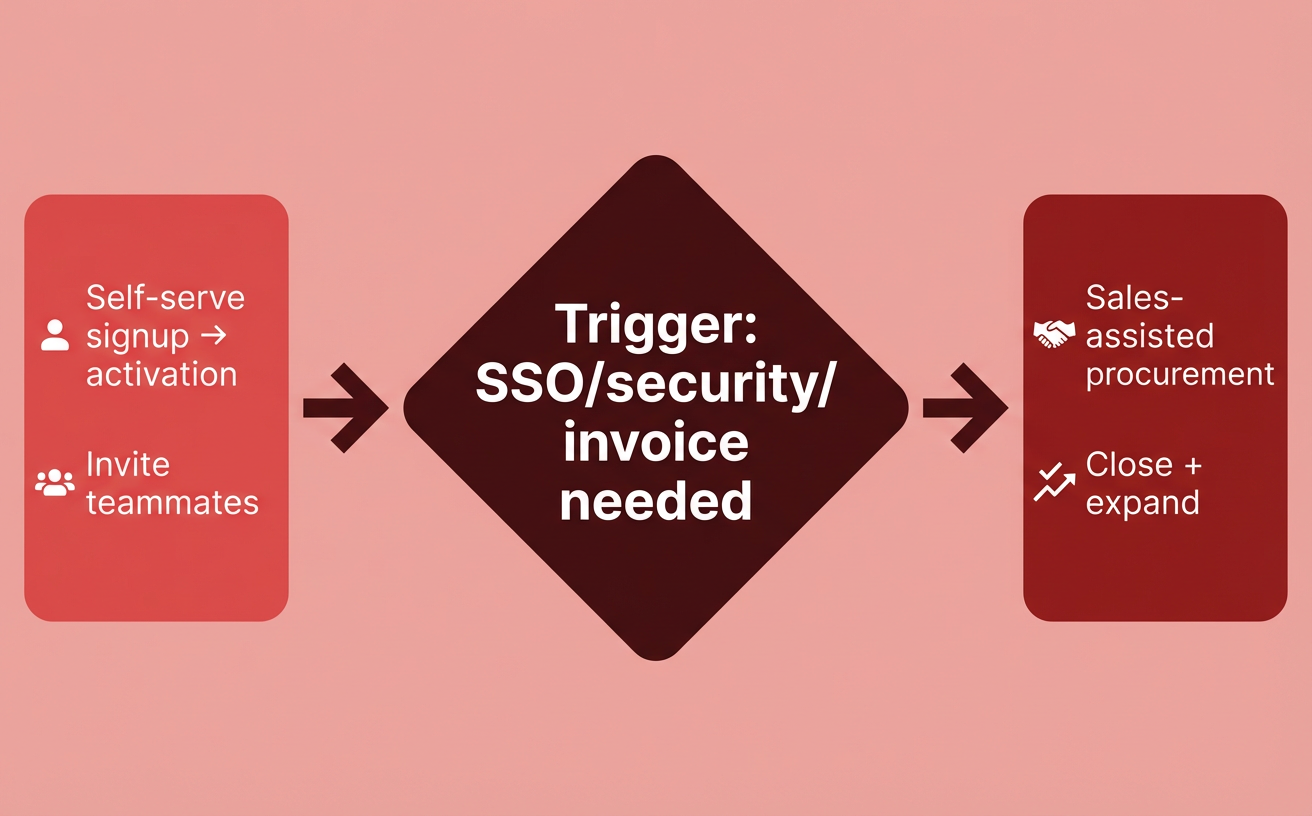
Product-led sales: keep self-serve fast, add sales only for enterprise blockers.
Your org and stack: who owns PLG and what tools you need
Assign clear ownership now: pick one cross-functional growth team, give it one metric to move, and make it accountable for a weekly experiment cadence and a reliable data pipeline. Your routing rules can disqualify bad-fit accounts, but PLG only scales when the org can learn faster than users churn. Tools like Radar help agencies identify and qualify their own traffic so your team spends analysis time on accounts that can actually become pipeline.
Choose a team model that avoids “growth vs product” turf wars
Prevent turf wars by defining decision rights, not just roles, because “growth” and “product” will otherwise optimize different outcomes. A practical model is a small growth pod (PM, engineer, designer, analyst/ops) that owns activation or expansion end-to-end, while core product teams own the roadmap outside that metric.
Make the model stick by writing a one-page charter that names the metric, guardrails, and who can ship what without approvals, and revisit it quarterly. If you’re formalizing operations, borrow the handoffs and tooling discipline from product ops in 2025 so experiments don’t turn into ad-hoc “shadow roadmaps” that nobody can support.
Keep incentives aligned by tying performance reviews to shared outcomes, not channel outputs like “more experiments” or “more features.” If hiring or team changes are creating friction, ask for HR support for teams so capacity planning, leveling, and hiring loops stop derailing your PLG cadence.
Set up analytics and experimentation without creating data chaos
Stop data chaos by standardizing events, identities, and dashboards before you run more tests. You want one source of truth for “activated,” “retained,” and “PQL,” plus documented event naming so marketing, product, and sales aren’t debating definitions in every meeting.
Use a simple stack pattern: product analytics for behavior, a warehouse (or at least a central dataset) for joining billing and CRM, and an experimentation layer with a clear rule for when to ship vs. roll back. If you’re an agency with multiple acquisition pages and client-specific traffic, Radar can surface which companies are visiting and what they care about, which helps you prioritize experiments that pull qualified accounts toward activation.
Create a weekly operating rhythm that forces learning
Force learning with a weekly rhythm that turns ideas into decisions, because “we’ll look at the data later” is how PLG stalls. Keep it lightweight, but consistent, and require every experiment to answer one question about user value.
Monday: review the metric, the biggest drop-off point, and pick 1–2 experiments to run.
Midweek: ship or launch, and sanity-check instrumentation so you can trust the readout.
Friday: decide “scale, iterate, or kill,” log the learning, and update the backlog based on evidence.
Handle edge cases explicitly: if the experiment touches pricing, data retention, or security, route it through a faster “risk check” so compliance doesn’t become a blanket veto. Use Radar alongside your product data when you need to sanity-check whether changes are helping the kinds of accounts your team can actually close, not just boosting sign-ups.
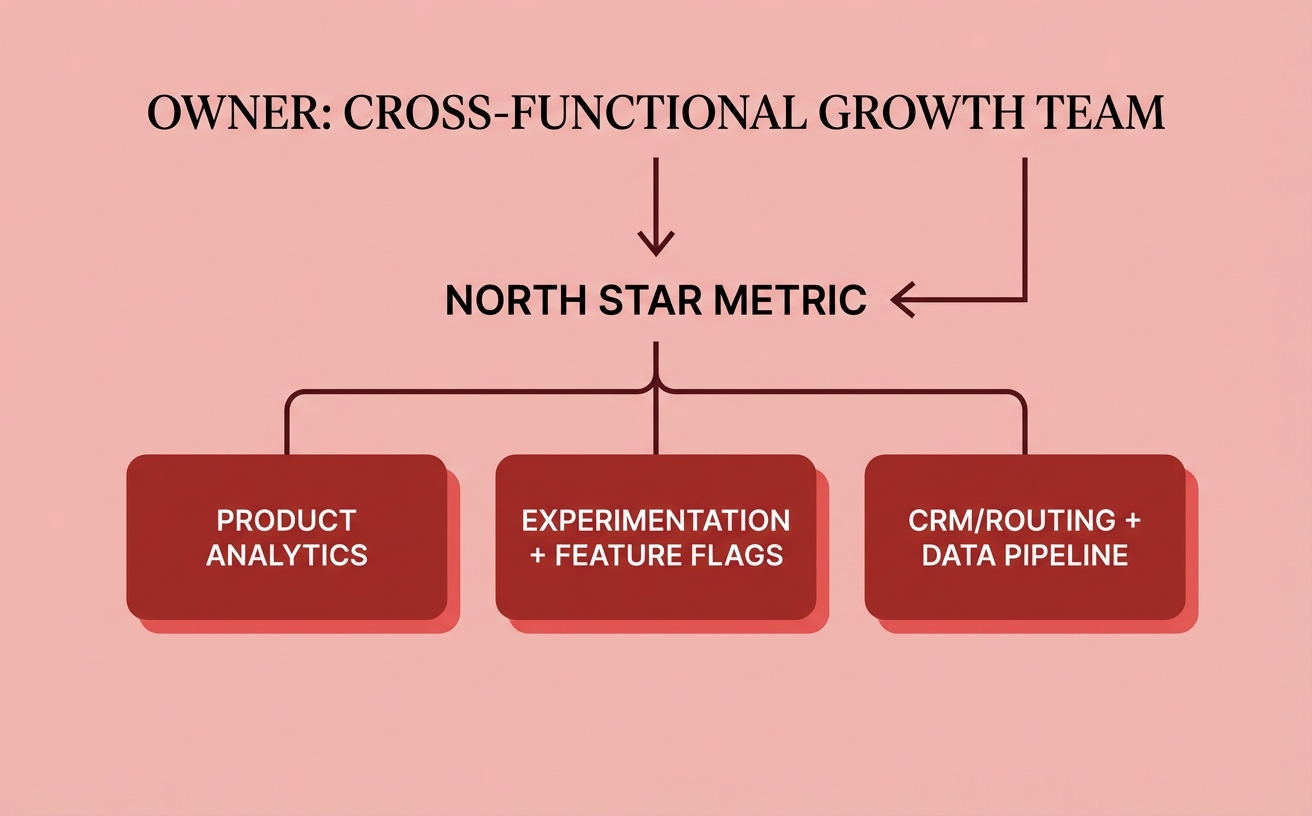
Ownership plus a reliable stack turns PLG into a weekly operating system.
PLG for B2B SaaS: how to win with longer buying cycles
Are you building PLG for people who love your product, or for the committee that has to approve it? B2B PLG works when you give end users fast wins and give admins and budget owners enough control and proof to say yes without slowing adoption. That’s how you shorten a long buying cycle: you let value spread bottom-up while removing the top-down reasons deals stall.
Your goal is role-based value: users get outcomes, managers get visibility, and admins get safety. Tools like Radar help here because you can identify which companies are engaging anonymously and then prioritize the workflows, templates, and proof points that match the accounts you actually want to land.
Design for multi-user adoption and team workflows from day one
Team adoption is the real activation event in B2B, because a lone user rarely has budget authority. You want your product to create “invite moments” where collaboration is the easiest way to get the job done, not a growth hack bolted onto onboarding.
Build the product so it naturally moves from me to we: shared workspaces, roles, comments/approvals, and templates that standardize how a team repeats the workflow. Even small choices matter—like making “share with teammate” the default CTA after a user creates their first artifact.
Invite triggers tied to real work (review, approval, handoff), not generic “add teammates” prompts.
Visibility loops like activity feeds or status updates that make teams check back without reminders.
Permission design that starts simple but expands cleanly as the account grows.
Sell to admins and IT with controls that don’t hurt UX
Admins buy reduction in risk and effort, so give them controls that don’t punish end users. The trick is progressive disclosure: keep self-serve onboarding lightweight, then surface governance when the account signals seriousness (more seats, sensitive data, or key integrations).
Provide an admin layer that’s separate from the daily user experience: SSO/SAML, SCIM provisioning, audit logs, data retention controls, and workspace policies. When Radar shows a target account ramping usage, you can proactively surface the right IT-ready checklist inside the product and route a product-qualified conversation without interrupting users mid-flow.
Use marketplaces and partner channels as PLG distribution
Marketplaces compress trust-building because buyers already have procurement paths and integration expectations. Treat listings and partner integrations as “product surfaces” that pre-qualify users with the right context, permissions, and data connected on day one.
Pick channels where your product becomes more valuable when it connects—cloud marketplaces, CRM ecosystems, and agency/service partners who implement your workflow. Radar fits naturally in partner motions too: agencies can use it to qualify inbound interest from their own traffic, then introduce your SaaS at the moment the account is showing intent rather than browsing.
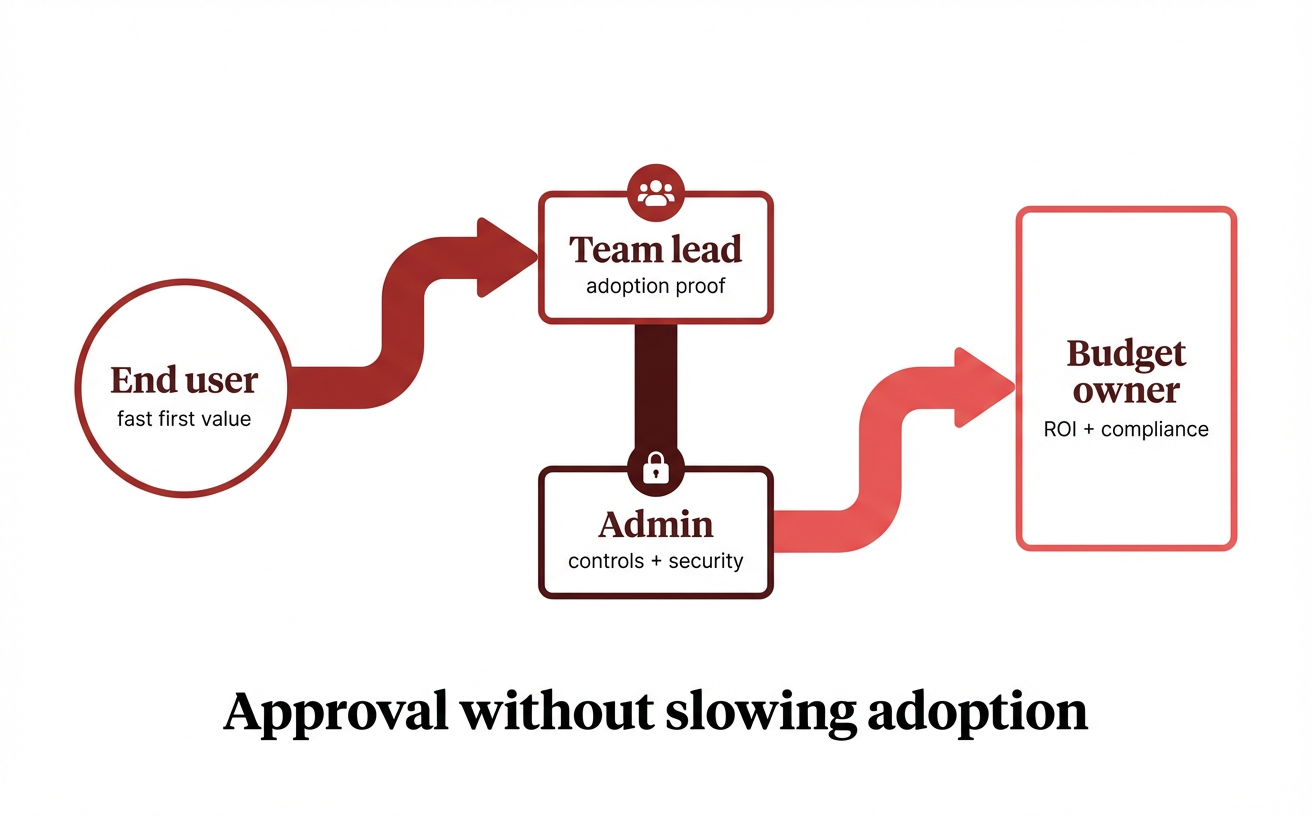
Win B2B PLG by serving both end users and the approval committee.
What product led growth SaaS really means (and what it isn’t)
PLG isn’t “no sales” or “just add a freemium plan”—it’s a decision to make your product the main driver of growth. When you treat the product as the channel, every click, invite, and “aha” moment becomes part of your go-to-market motion instead of something marketing has to compensate for. That’s also why tools like Radar matter here: they help agencies see which anonymous visitors are showing real intent so your product experience and your outreach can reinforce each other instead of guessing.
The real definition: product as the primary growth engine
Product-led growth SaaS means the product drives acquisition, conversion, retention, and expansion by design. You still use marketing, content, partners, and sometimes outbound, but they point people into a product experience that does the heavy lifting. If you can’t clearly describe how a new user gets to first value quickly, you don’t have PLG—you have a sign-up form.
PLG stays strategic when you treat it like a system, not a feature. You decide who the product is for, what “success” looks like in the first session, and what behavior predicts long-term value, and you document it like you would any GTM foundation; if you need a structured way to do that, use this guide to build a marketing plan so your activation work maps to positioning, channels, and revenue. Radar can support that system by showing which accounts are engaging repeatedly, so your team prioritizes product-qualified interest instead of noisy traffic.
Why PLG wins—and where it breaks down
PLG wins because it compounds. Each onboarding improvement, template, integration, or collaboration hook can lift acquisition and retention at the same time, which is hard for pure demand-gen to match. It also creates faster learning loops because the product produces behavioral data every day, not just quarterly pipeline reports.
PLG breaks down when the product can’t carry the full buying journey. You’ll feel friction if your time-to-value is long, if security reviews block adoption, or if the buyer is an admin who never touches the UI. Watch for these common failure modes:
Activation is vague, so teams optimize sign-ups instead of meaningful first value.
“Self-serve” becomes “self-abandon”, because onboarding doesn’t adapt to different roles or use cases.
Sales gets bolted on late, so handoffs feel intrusive and users churn before procurement starts.
Examples you can learn from without copying blindly
Steal patterns, not playbooks. Collaboration products often grow through invites and shared workspaces, dev tools often grow through usage-based entry points and integrations, and workflow tools often grow through templates that deliver instant outcomes. Your job is to identify which mechanic fits your user’s “job to be done,” then measure whether it improves activation and retention, not just top-of-funnel volume.
Use PLG signals to decide when humans should step in. With Radar, agencies can identify and qualify their own traffic—like repeat visits from the same company, pricing-page loops, or high-intent feature exploration—then route the right accounts to a helpful conversation while everyone else continues self-serve. That’s what PLG looks like in practice: product first, with sales and strategy added where the product alone can’t close the loop.
Turn PLG Traffic Into Pipeline with Radar Now that you’ve got the PLG SaaS playbook, use Radar to identify, qualify, and prioritize your agency’s site traffic so you can reach the right accounts sooner. |
Make PLG win by focusing on one milestone and one cohort
PLG moves fastest when you choose one activation milestone, instrument it end-to-end, and ship weekly improvements tied to that outcome. Treat activation like a product feature with a clear owner, tight definitions, and an iteration loop you can actually sustain.
Durable PLG happens when users can discover value, reach value, and pay for value without waiting on a human. Then add sales only where it accelerates high-intent accounts, while keeping the default path self-serve for everyone else.
You’ll know it’s working when cohorts improve on activation, retention, and expansion—not just sign-ups. If you’re an agency, tools like Radar help you identify and qualify your own anonymous traffic so sales can prioritize the right accounts without breaking the PLG motion.