

What is n8n: No-Code Workflow Automation in 2025

Last update: 21 April 2026 at 09:49 am
In today’s increasingly digital and competitive business environment, process automation is essential for companies seeking greater efficiency and profitability. If you want to save time, reduce errors, and increase your team’s productivity without programming skills, n8n is one of the best tools on the market.
In this article, we explain what n8n is, how it is commonly used, and its benefits. We also provide a practical guide to help you start automating tasks in your business.
Ready to get started?
Key Article Takeaways
- What is n8n? It’s an open-source automation tool that connects your applications without requiring code. It’s ideal for businesses of all sizes.
- The main benefits are saving time, improving efficiency, maintaining data control, and creating fully customized workflows.
- Common uses in American businesses include marketing, sales, customer service, e-commerce, and internal management automation.
- When comparing n8n to Zapier, both platforms are no-code, but n8n offers more control and flexibility, as well as long-term cost-effectiveness. Zapier, on the other hand, excels in simplicity.
- Any business can start automating tasks without programming knowledge. Agencies on Sortlist USA can help you implement it.
What is n8n?
n8n (pronounced “n-eight-n”) is a workflow automation platform that enables you to connect applications and services without writing code. This feature makes n8n one of the best options on the market in 2025. Typically, creating workflow automations requires extensive programming knowledge, but n8n comes with templates for common workflows. With these, you can easily start automating repetitive tasks for your team and organization.
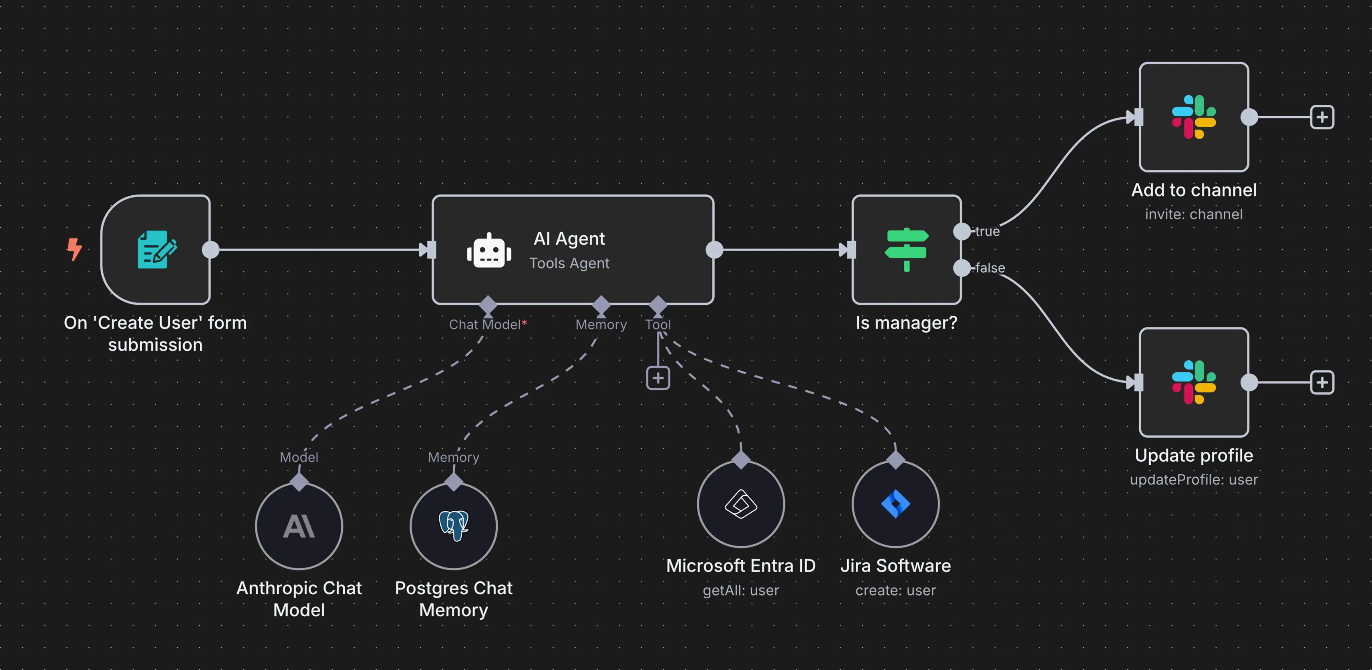
It’s an open-source tool, so you can use it for free, adapt it to your needs, and host it on your own server.
With n8n, you can create automated workflows that connect your daily tools, such as Gmail, Google Sheets, Slack, Notion, HubSpot, and Trello, and make them work together intelligently and automatically. Later, we’ll explore the most common uses of this tool by different organizations.
Benefits of Using n8n for Your Business Workflows
Adopting n8n in your company doesn’t just mean automating tasks; it means transforming the way your company works. This tool offers many benefits. Here are some of the most important:
- No-code automation: Create visual workflows with drag-and-drop nodes, without needing technical knowledge.
- Time savings: Eliminate repetitive tasks and allow your team to focus on what really matters.
- Complete flexibility: Since it’s open source, you can customize it to fit your exact needs.
- Security and control: Keep your data on your own hosting if you prefer.
- Unlimited integrations: It is compatible with hundreds of applications and APIs, including the entire Google suite, OpenAI, Slack, HubSpot, Telegram, Discord, Trello, Airtable, Twilio, WooCommerce, and Microsoft.
- Scalability: Perfect for freelancers, SMBs, and large enterprises.
Common Uses of n8n, an Open Source Tool
One of n8n’s main advantages is its versatility. This tool can adapt to virtually any business or sector, including startups, marketing agencies, e-commerce stores, and industrial companies. With n8n, you can connect your favorite applications and create intelligent workflows that will save you hours each week on manual tasks, without needing to know how to code.
Below, we demonstrate some of the most common uses of n8n in American businesses.
- Digital marketing: Automate content publishing on social media, lead management, database organization, and newsletter distribution. Generate automatic campaign reports and centralize data in a single spreadsheet.
- Sales and CRM: Automatically sync data from your web forms with your CRM, such as HubSpot or Pipedrive. Create alerts for new potential customers, assign tasks, and effortlessly track every opportunity.
- Customer service: Connect contact forms or live chats with support tools like Zendesk, Freshdesk, or Slack. This allows you to respond faster to customers, reduce wait times, and improve the user experience.
- E-commerce: Automate confirmation emails, update inventories, and manage order notifications without manual intervention. You can also create flows to recover abandoned carts and improve conversions in your online store.
- Internal management: integrate Google Sheets, Notion, or your ERP to keep information always updated and accessible to the entire team. n8n allows you to connect different business areas and optimize administrative tasks in seconds.
If you’re interested in implementing these automations in your company, there are specialized digital transformation agencies ready to help you begin this process and embrace the future.
Zapier vs n8n: Which One is Right for You?
Both Zapier and n8n are tools that let you connect applications and automate workflows to save time. However, each tool has specific advantages depending on the user or business type.
Below, we’ll take a detailed look at the similarities and differences between these two platforms, as well as their recommended uses.
Similarities between Zapier and n8n
- No-code approach: Both options allow you to create visual automations without any programming knowledge.
- Extensive integrations: They both connect with hundreds of popular applications, such as Gmail, Slack, Notion, Trello, and Google Sheets.
- Time savings: They eliminate repetitive tasks and streamline administrative and marketing processes.
- Intuitive use: They both have visual interfaces and easy-to-understand workflows, even for beginners.
In short, both tools serve the same purpose: to save time and automate processes. What are the differences? We’ll explore those next.
Key Differences Between Zapier and n8n
While both platforms share similar goals, there are notable differences between Zapier and n8n.
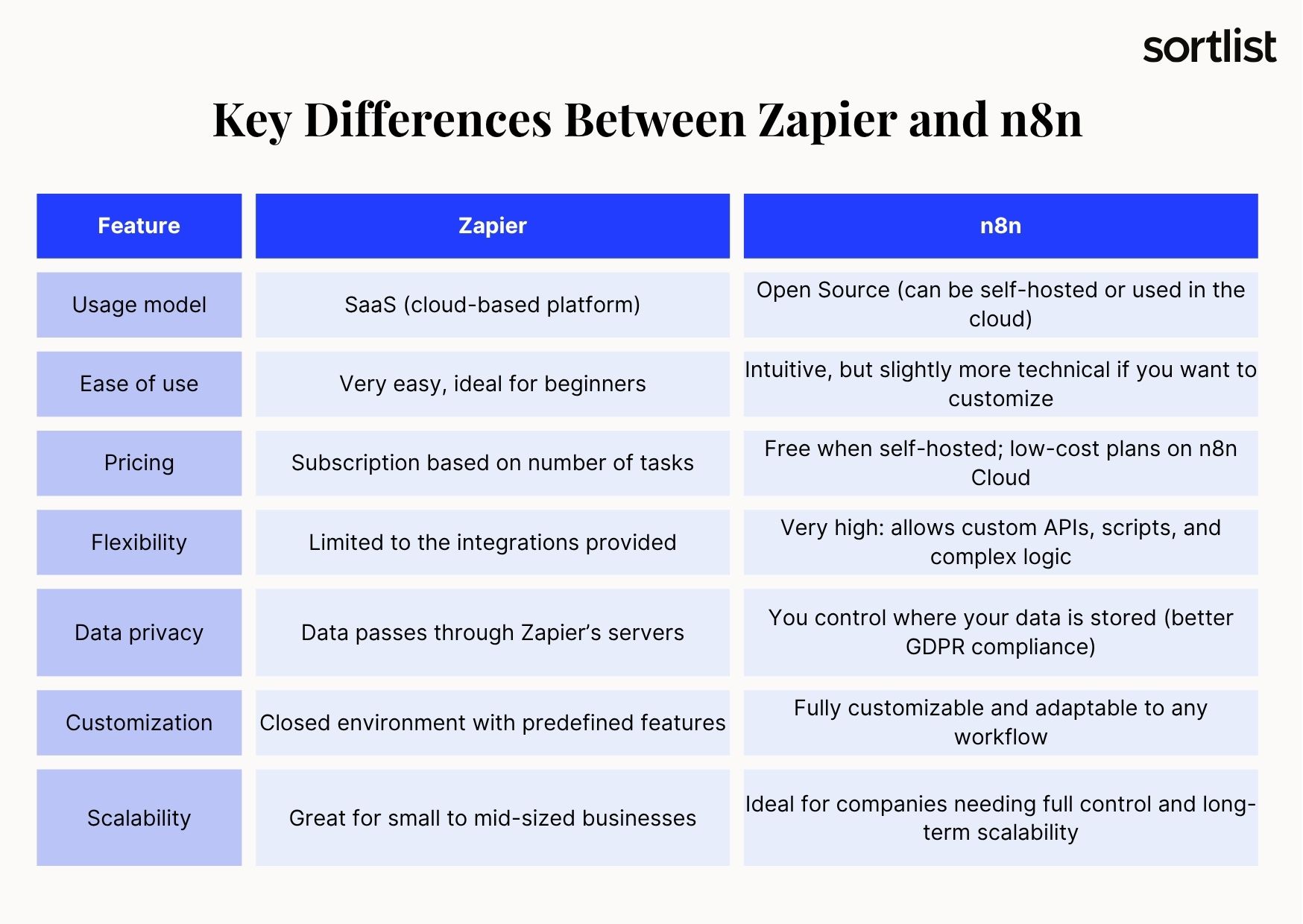
We’ll explain the most important differences below to help you choose the system that best fits your business and its operations.
Usage Model:
- Zapier is a 100% cloud-based (SaaS) tool that is ready to use from day one.
- n8n is open source, so you can host it on your own server or use the cloud version, n8n Cloud.
Level of Control and Privacy:
- With Zapier, all data passes through their servers.
- With n8n, however, you decide where the data is stored, which offers greater privacy and regulatory compliance, such as with GDPR.
Workflow Customization:
- Zapier offers predefined templates for simple automation.
- In contrast, n8n allows you to create complex workflows, add conditions and loops, and connect to custom APIs.
Scalability and Cost:
- Zapier’s pricing is based on the number of tasks executed per month. Their plans range from $19.99 per month to custom plans based on user count.
- n8n is open source, so it has no execution or action limits when hosted on a local server. This makes it more cost-effective in the long run.
Ease of Use:
- Zapier is the ideal option for beginners who want quick results.
- n8n requires a slightly higher technical level, but it offers more power and control. With the right tutorials and guidance, you can quickly learn to use it.
Recommended Uses for Each Tool
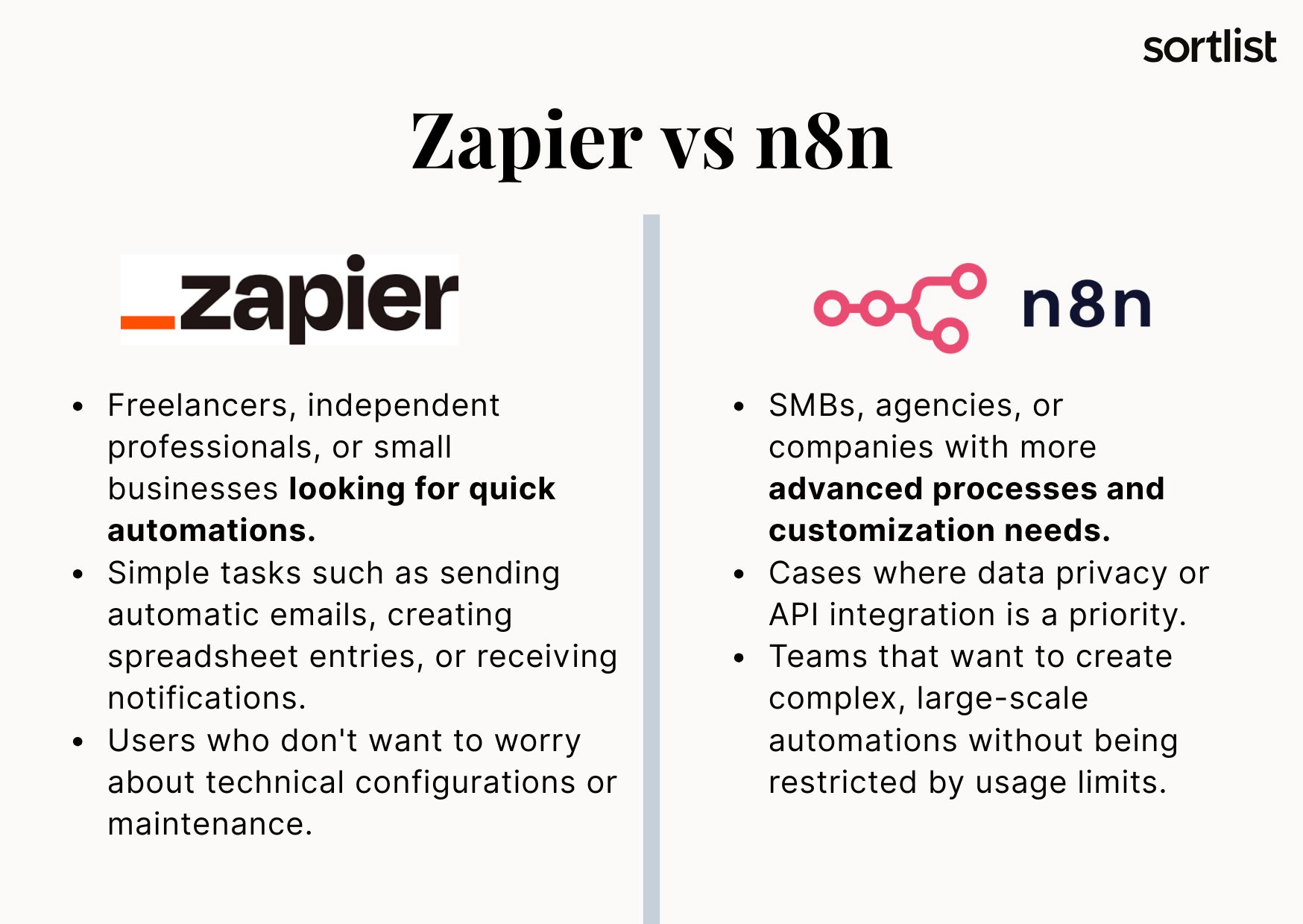
With all this in mind, here’s our take on the appropriate use case for each tool.
Zapier is perfect for:
- Freelancers, independent professionals, or small businesses looking for quick automations.
- Simple tasks such as sending automatic emails, creating spreadsheet entries, or receiving notifications.
- Users who don’t want to worry about technical configurations or maintenance.
n8n is ideal for:
- SMBs, agencies, or companies with more advanced processes and customization needs.
- Cases where data privacy or API integration is a priority.
- Teams that want to create complex, large-scale automations without being restricted by usage limits.
Which One to Choose?
If ease, speed, and zero maintenance are your priorities, Zapier is the most convenient option. For more control, customization, and scalability, n8n is the most powerful, cost-effective alternative.
Many businesses in the US use both tools. They use Zapier for quick automations and n8n for strategic or high-volume processes.
Want to know which tool best fits your business needs? Find automation experts with experience using both Zapier and n8n in our directory and get personalized advice.
How to Automate with n8n Step by Step
As mentioned earlier, one of n8n’s greatest advantages is its ability to enable you to create visual automations without writing a single line of code. Its intuitive interface is designed so that anyone, even those without technical knowledge, can create efficient workflows in just a few minutes.
Below, we’ll explain how to start automating with n8n step by step. Follow these steps to transition from manual processes to automated, efficient operations in a matter of hours.
Step 1: Register or Install n8n
There are two ways to get started:
- Use n8n Cloud, the cloud-based version, which is ideal if you don’t want to worry about installation.
- The second option is to install n8n on your local server, which is perfect if you need greater privacy and control over your data.
Visit n8n.io, register, and select the option that best meets your business needs.
Step 2: Create a New Workflow
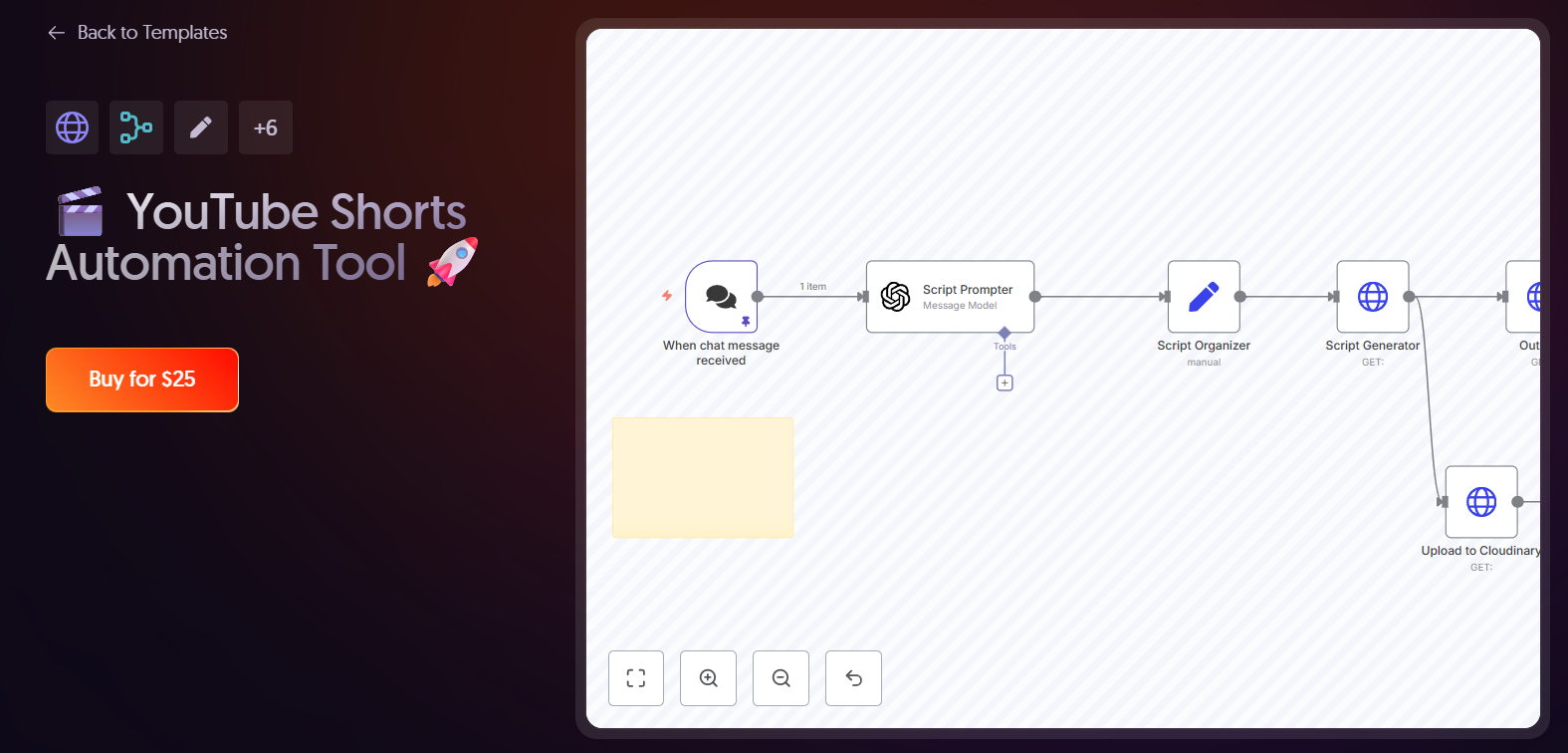
Once you’re in the dashboard, click “New Workflow.” A blank canvas will appear where you can build your automation step by step using nodes or action blocks to connect your applications.
Step 3: Add Your Application Nodes
Each node represents an action, an event, or an application.
For example, you can create a workflow that:
- Receives data from a web form.
- Automatically saves the data to Google Sheets.
- Then, it can send a notification to your team via Slack or email.
To do so, simply drag and drop the nodes and indicate how they connect to each other.
Step 4: Set up conditions and rules
With n8n, you can add conditionals, filters, and loops to customize your automations. For instance, you can configure an action to execute only if a customer belongs to a particular category or if certain numerical values are met. These features make your workflows smarter and better adapted to your business needs.
Step 5: Test and Execute Your Automation
Before activating it, click “Execute Workflow” to test the process and ensure that everything is working correctly. This allows you to see each step of the process, identify potential errors, and easily adjust the workflow.
Once everything is ready, activate the workflow to ensure that it runs automatically when the defined events occur, such as when a new lead is received or a sale is made.
Conclusion
n8n is more than just an automation tool; it’s a smarter way to work. It enables businesses to reduce manual tasks, boost efficiency, and grow seamlessly without requiring coding knowledge.
Automate your business today with n8n. If you need assistance, visit our directory to find specialized digital transformation agencies in the United States.


