

How To Build an Impressive Graphic Design Portfolio

A graphic design portfolio is a curated collection of your best work intended to showcase your skills, creativity, and versatility. In 2025, when competition is fierce and design trends are evolving rapidly, a well-crafted portfolio can be the deciding factor in whether you land a job.
As you prepare to start working on your portfolio, it’s important to understand that it’s more than just a gallery. It’s your personal brand. It’s proof of your ability to solve visual problems and makes a first impression on potential clients or employers.
In this article, we aim to help you grasp three key points:
- What makes a strong and effective graphic design portfolio?
- How can you strategically tailor your portfolio for different types of work?
- What practical steps and tools can help you build and maintain it over time?
Are you ready to get started?
Key Takeaways
- Your portfolio is more than a gallery; it’s your personal brand. A great graphic design portfolio does more than showcase visuals. It tells a story, reflects your design process, and communicates your unique value to clients or employers.
- Strategy and curation matter more than volume. Tailor your portfolio to your target audience. Select only your strongest and most relevant work. Present each project with clear context and outcomes.
- Portfolios are living documents; keep them updated. Refresh your portfolio regularly with new work, remove outdated projects, and optimize it for the web, mobile devices, SEO, and accessibility. This will help you stay current and competitive.
What Is a Graphic Design Portfolio?
A graphic design portfolio is a collection of your design work that showcases your strengths, creative process, and capabilities. It usually includes:
- Selected project samples
- Descriptions and context
- Case studies or process breakdowns
- A contact or bio section
In other words, it’s proof of your competence and style.
Key Elements of a Strong Portfolio
Before uploading projects to your portfolio, it’s important to understand what makes an effective portfolio. A strong portfolio isn’t just about showcasing beautiful visuals; it’s about presenting a cohesive, strategic narrative that aligns with your objectives and connects with your target audience.
- Curate, don’t clutter: Only include your best and most relevant work.
- Project context: Explain the problem, your role, and the result.
- Visual consistency: Cohesive design and branding are important.
- Easy navigation: This is especially important for digital and online portfolios.
- Mobile responsiveness: Many employers view portfolios on mobile devices, you want to make sure they have the best user experience.
- Personal touch: Add your voice, design philosophy, or unique style.
Strategies and Practical Applications of Great Graphic Design Portfolios
With that in mind, remember that creating an effective graphic design portfolio requires more than just uploading your best work. It requires strategic thinking about how you present your projects, who your target audience is, and what message you want to convey.
The following practical strategies will help you build a portfolio that speaks directly to your desired work opportunities.
- Tailor to Your Audience: Don’t take a one-size-fits-all approach. Instead, customize your portfolio for each audience. For example, if you’re applying to a branding agency, highlight projects showcasing logo development, brand identity systems, typography, and packaging. However, if you are aiming for UI/UX roles, lead with wireframes, interactive prototypes, user journeys, and accessibility considerations.
- Tell a story: Each project in your portfolio should tell a story beyond just the visuals. Begin with a brief description of the challenge or objective, explain your creative approach, and show the final result. Use a simple case study format.
- Use real-world context: Show how your designs function in the real world. Use mockups to show your branding work on business cards, signage, or packaging. For web and app designs, display them on screens, such as laptops, tablets, or phones.
- Include unfinished work or iterations: Don’t be afraid to include drafts, sketches, or alternate versions of a final design. This demonstrates that you’re not just a decorator; you’re a thinker and a problem solver. Employers and clients love seeing how your ideas evolve, the challenges you face, and how you respond with creative solutions.
- Keep it updated: Your portfolio should be a living document, not a one-time project. As your skills grow, your work should reflect that progress. Set a reminder to review and update your portfolio every three to six months. Remove old or less relevant projects and add new ones.
Thoughtfully applying these strategies will make your graphic design portfolio stand and position you as a confident, intentional designer who understands how to communicate value through design.
Step-by-Step: How to Create Your Own Graphic Design Portfolio
Whether you’re starting from scratch or updating an outdated portfolio, a structured process can save you time and help you achieve a polished result. Here’s a step-by-step guide to help you build a professional graphic design portfolio that showcases your skills and attracts the right opportunities.
Step 1: Define your purpose and audience. Decide what type of work you want: freelance, agency, or in-house. Identify your target audience, which may include clients, recruiters, or creative directors.
Step 2: Gather and curate your best work. Select five to eight of your strongest and most relevant projects. Make sure you prioritize quality over quantity.
Step 3: Write case studies or descriptions. For each project, include: challenge, role, process, and results.
Step 4: Choose the right platform. Some of the most common options include: Adobe Portfolio, Webflow, Wix, Behance/Dribbble.
Step 5: Design and structure the layout. You want to make sure you include key pages:
- Home: Introduction and featured projects
- Work: Full portfolio or case studies
- About: Bio, headshot, and design philosophy.
- Contact: form, email, and social links.
- Keep the layout clean, intuitive, and visually cohesive.
Step 6: Optimize for web and SEO. Add alt text to images, use descriptive page titles and meta descriptions. Ensure mobile responsiveness and fast load times. Test for accessibility, such as ensuring adequate contrast, readable fonts, and keyboard navigation. Don’t forget to use relevant keywords (e.g., “graphic designer in [location]”).
Step 7: Review, test, and publish. As you get ready to publish your own portfolio, you want to make sure you check:
- Links, spelling, and formatting.
- Cross-browser and mobile compatibility.
- Feedback from peers or mentors
Step 8: Publish and share your portfolio on:
- Personal website
- Email signature
- Social media
Step 9: Maintain and update regularly. Set reminders every 3–6 months to add new work, remove outdate projects, refresh descriptions or visuals.
Common Graphic Designer Mistakes to Avoid When Working on Your Portfolio
Even talented designers can fall into common traps when building their own graphic design portfolios. Avoiding these mistakes will help you present your work more clearly, professionally, and persuasively
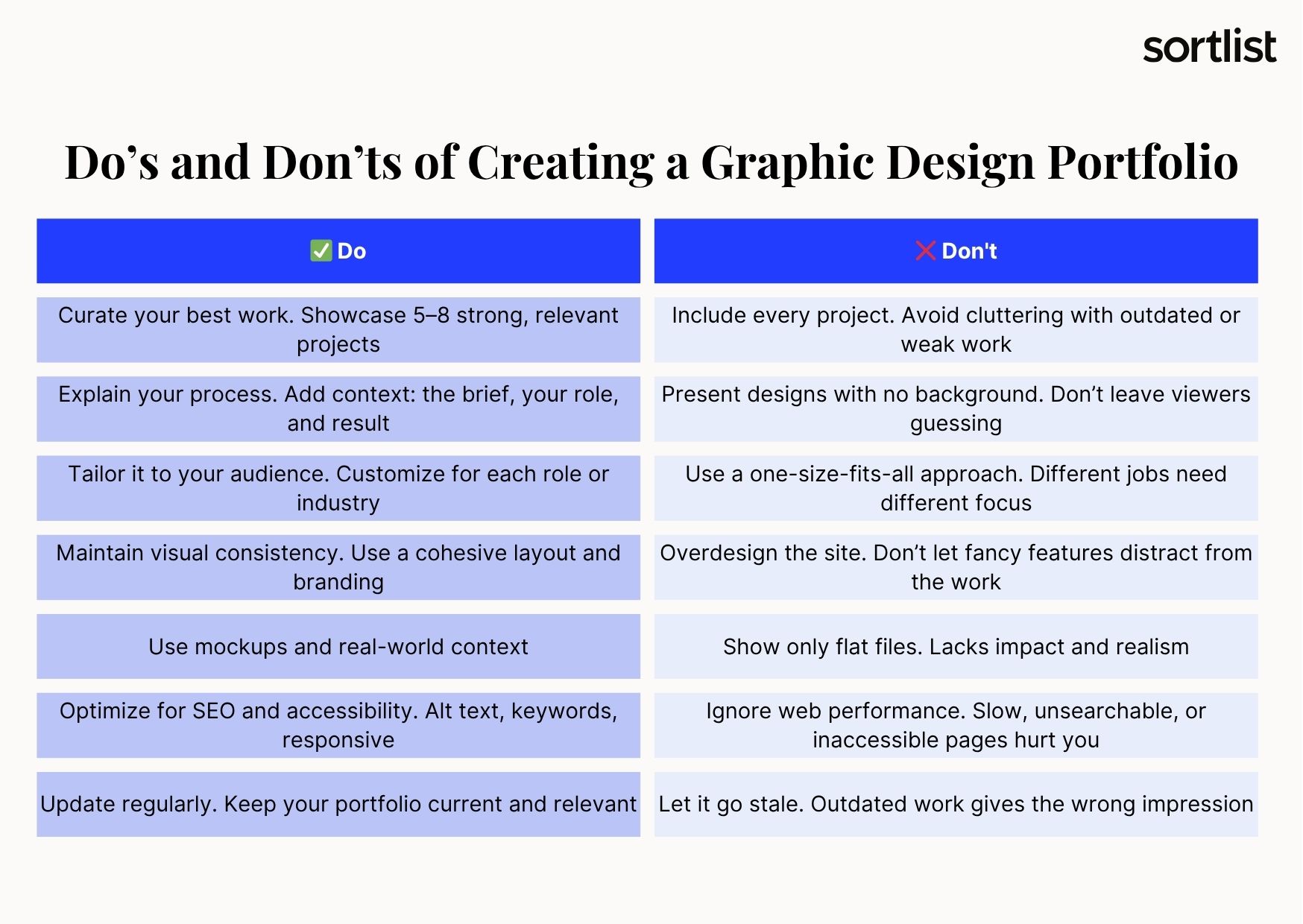
- Including too many projects. While it may be tempting to showcase everything you’ve ever created, quality always outweighs quantity. A few well-executed, thoughtfully presented pieces will make a stronger impression than a crowded collection of mediocre work. Focus on pieces that best represent your skill set and align with your goals.
- Presenting designs without any explanation. While visuals are important, they need context to be fully appreciated. Viewers want to understand the purpose of each piece—what problem you solved, what your role was, and how the design contributed to the final outcome. Simply showing an image without background information can make your work seem disconnected or superficial.
- Overdesigning the portfolio itself. This includes adding unnecessary animations, complex navigation, or excessive styling that distracts from the actual content. While creativity is welcome, the portfolio should never outshine the work it’s meant to showcase. A clean, intuitive presentation allows your projects to speak for themselves.
- Lacking personal branding. Your portfolio is an extension of your identity as a designer. It should feature consistent typography, color schemes, and tone of voice, as well as a short bio or mission statement that reflects your personality and professional style.
- Missing SEO optimization and accessibility. This can make them difficult to discover or navigate, particularly for clients with diverse needs. Use descriptive alt text, semantic HTML, and responsive design to make your portfolio discoverable and inclusive.
By avoiding these common mistakes, you’ll create a killer portfolio that clearly communicates your professional background, expertise and strengths, and leaves a positive, lasting impression.
Conclusion
Your graphic design portfolio is more than just a collection of work. It’s your professional voice, your visual résumé, and your personal brand, all rolled into one. No matter if you’re a student, freelancer, or seasoned designer, investing time and thought into your portfolio can open doors, land you jobs, and attract ideal clients.
Keep it focused, personal, and evolving. The stronger your portfolio, the louder your work will speak for you.
Now’s the time to take control of your creative narrative. Start building or refining your portfolio today!


